Google Business Profile Verification: How to Verify Your Business on GBP
If your local listing is not verified, your customers may not find you when they search. Google Business Profile verification proves that your business exists, operates where you say it does, and is managed by someone authorized to update it. Verification is just one element of your overall Google Business Profile optimization strategy, which can help increase your business’s visibility, reputation, and customer engagement. Here’s what you need to know as of 2026.
Key Takeaways
- Essential for Local SEO: Google Business Profile verification is essential for local SEO because, without verification, your business will not appear publicly on Google Maps or local Search results. Verifying your Google Business Profile (GBP) is crucial for enhancing your business’s visibility in local search results, as only verified listings appear in the Local Pack and on Google Maps.
- Video-First Approach: Video is now the primary business profile verification method for many new listings, address changes, and higher-risk categories; phone and email are secondary options when available.
- Processing Timelines: Most verification process reviews take a few business days. Instant verification can happen immediately, while video verification and live video call reviews often take 1–5 business days.
- Complete Administrative Control: A verified Google Business Profile gives you full control over business information, reviews, posts, photos, and insights while protecting your brand from fraud or incorrect business info.
- Professional Troubleshooting: If you see “No more ways to verify,” repeated denials, or a re-verify request, Timmermann Group helps businesses and agencies troubleshoot, document evidence, and work with Google’s support team.
What Is Google Business Profile Verification and Why It Matters
Google Business Profile verification is how Google confirms that a business exists, is connected to a real business location or service area, and is managed by an authorized representative. This business profile verification step is required before you can fully manage your business on Google.
Only verified Google Business profiles can fully update business information such as business name, business address, business hours, phone number, website, and business category. Verification of your GBP ensures that you have control over your business information, preventing unauthorized changes and maintaining the accuracy of your listing, which is essential for attracting potential customers.
Verification also matters because:
- Verifying your Google Business Profile (GBP) is crucial for enhancing your business’s visibility in local search results, as only verified listings appear in the Local Pack and on Google Maps.
- Your profile can show for searches like “plumber near me,” “dentist in Chicago,” or nearby businesses in your category.
- Businesses with a verified Google Business Profile are twice as likely to be considered reputable by users, which significantly boosts customer trust and credibility.
- Verification protects your Google Business Profile listing from impersonation, spam edits, and fake locations.
At Timmermann Group, we treat a verified, optimized profile as a foundation for local search optimization. It fits our “Conversions, not Diversions” philosophy because visibility only matters when it leads to calls, visits, bookings, and revenue.
How to Check Your Google Business Profile Verification Status
Many businesses assume their Google Business Profile is verified because it appears somewhere in Google Search. That is not always true. An unverified or partially verified business profile may have limited visibility and locked features.
To check your verification status:
- Sign into the correct Google account.
- Search your business name on Google.
- Look for in-search controls such as “Edit profile,” “Get verified,” or “Verification required.”
- Open your profile in the GBP dashboard or Google Maps app.
- Look for messages such as “You manage this Business Profile,” “Get verified,” or “Verification required.”
You can also use Google’s verification status tool or in-product prompts to see whether the verification process is pending, complete, or failed. If your verification screen says someone else owns the listing, use “Own this business?” or “Request ownership” and follow Google’s transfer process.
If a former employee, past agency, or franchise team owns more than one business listing, do not create duplicates. Request access first.
Step-by-Step: How to Verify Your Google Business Profile
The exact verification process depends on your business type: storefront business, service area business, or hybrid. To successfully verify your Google Business Profile, you must log into your profile dashboard and complete the specific method assigned to you by Google.
Follow these steps:
- Create or claim your Google Business Profile listing.
- Confirm whether you have a physical location where customers visit, a service area where you travel to customers, or both.
- Enter accurate business details: business name, business address or service area, phone, website, business hours, and category.
- Click “Get verified.”
- Follow the on-screen instructions exactly.
If you travel to customers, such as plumbers, electricians, HVAC companies, landscapers, or mobile dog groomers, indicate a service area instead of showing a public business address. Online-only businesses are not eligible for local Google Business listings unless they have direct in-person customer contact that meets Google’s rules.
As of 2026, postcard verification is rare or deprecated in many regions. Google now leans on video, phone, and email after you click “Get verified.” Verification methods may vary based on your business type, public information, region, or business hours, and Google will present the appropriate options once you claim your listing.
Don’t make the mistake of assuming you can choose any different verification method. Google decides which verification option to offer based on trust signals, category, history, and location.
Current Google Business Profile Verification Methods
Google offers several methods for verifying your Google Business Profile, including postcard, phone, email, video recording, live video call, and bulk verification for multiple locations. These business profile verification methods vary by profile.
Video verification, including live video and recorded video, is now the most common approach for new profile verification and major edits. Email and phone are more likely when Google already trusts the number or domain on the profile. Instant verification through Google Search Console and bulk verification are special cases that can speed up verification for qualified businesses.
For official requirements, review Google’s Business Profile verification guidance.
Video Recording Verification
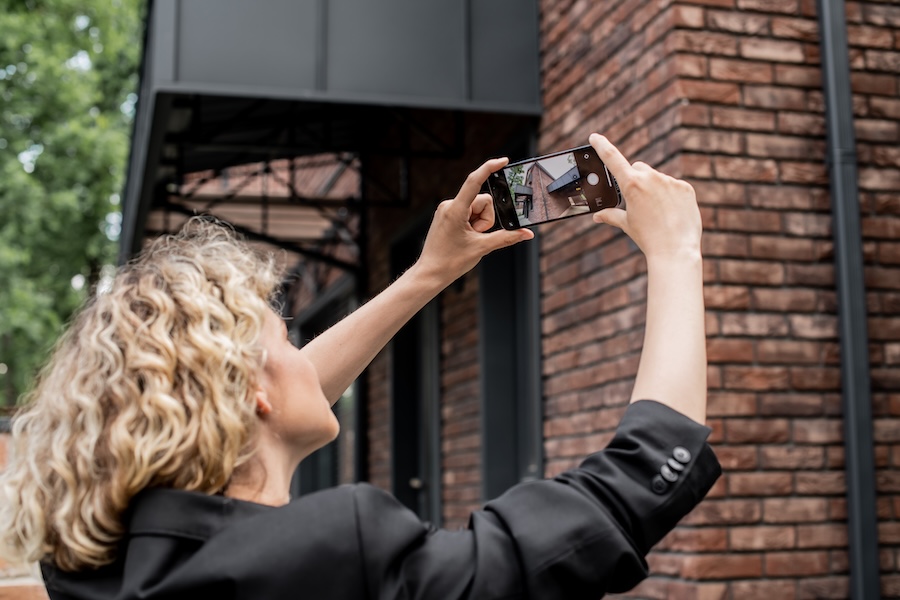
Video recording is the primary method for many storefront and service-based businesses. To verify your business via video recording, you must create a continuous, unedited video that showcases your business location, operations, and proof of management. Video verification requires a stable internet connection and must be completed using the Google Maps app on your mobile device.
For storefronts and hybrid businesses, your verification video should show:
- Exterior of the building.
- Nearby street sign, intersection, or recognizable surroundings.
- Permanent business signage matching the profile of the business name.
- Entrance to the location.
- Interior workspace where you serve customers.
- Proof you control the space, such as unlocking the door, accessing a storage room, showing a cash register, or entering staff-only areas.
For a service area business, show:
- Branded vehicles.
- Tools, equipment, uniforms, and inventory.
- Workspace, garage, or office used by the business.
- Marketing materials.
- Non-sensitive business documents, such as a business license, utility bill, or invoice with private details covered.
The video must be recorded and uploaded directly through Google Maps or the Google Business interface. Do not pre-record a file and upload it later. Aim for 60–90 seconds. Keep the camera steady, avoid cuts, and do not switch networks during upload. Common failures include no signage, a mismatched business name, an unclear location, showing only a home interior, missing proof that the business operates, or technical issues.
Live Video Call Verification
Live video call verification is a scheduled video call with a support representative or Google representative. During the call, the representative may ask you to show signage, exterior surroundings, interior workspace, tools, equipment, vehicles, and proof that you can access the location.
This video call verification method is often used when a profile is stuck or when other methods are not enough. Support availability depends on region and language, so plan a specific time window.
Before the call, prepare documents, uniforms, vehicles, POS systems, industry software, and access to locked areas. Timmermann Group can help script and rehearse the live video walkthrough so your team knows what to show and what to avoid.
Phone and Email Verification
Phone and email verification are now most common for older, unclaimed listings where Google already trusts the contact information.
With phone verification, Google calls or texts the number on the profile with a short verification code. You enter that code immediately in Google Business Profile Manager.
With email verification, Google sends a verification code and link to a business email, often at your website domain. If the phone or email belongs to a past owner, you may need ownership recovery or supporting documentation first.
Automated phone trees can block verification codes, so use a human-monitored line during verification.
Instant and Bulk Verification
Instant verification can happen when the same Google account manages your profile and a domain already verified in Google Search Console. To qualify, your website, citations, and NAP information need to be consistent.
Bulk verification is for chains, franchises, or brands with 10 or more locations. You submit location data through the Verifications or Chains section of the dashboard and may need documentation proving control over all locations.
Bulk review can take several business days because Google checks business information across multiple locations. Timmermann Group supports multilocation brands with NAP cleanup, structured location data, location group planning, and local SEO strategy across markets.
How Long the Verification Process Takes (and What to Expect)
Verification timing depends on the method, region, and how much Google already trusts your business details. Once you submit your video or enter your code, it can take Google a few business days to process and fully verify the account.
Typical timelines:
- Video recording and live video: Usually 1–5 business days.
- Phone and email: Often same day, but manual review can still happen.
- Instant verification: Immediate if eligible.
- Bulk verification: Several business days or longer.
- Verification postcard: Often 5–14 days when still available.
Avoid heavy edits while your profile is under review. Changing your name, address, category, or service area during review can reset the process or raise trust concerns. Timmermann Group can monitor verification status, coordinate with the support team, and align verification with launches, rebrands, or new market campaigns.
Common Google Business Profile Verification Problems and How to Fix Them
Many legitimate businesses run into denials, repeated prompts to verify your business, or “No more ways to verify.” Google is more aggressive about fake listings, lead-gen profiles, virtual offices, and spam.
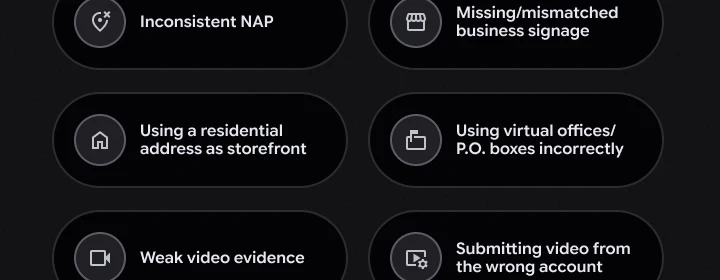
Common reasons for Google Business Profile verification failures include inaccurate business information, missing proof of business details, and technical issues. Other common causes include:
- Inconsistent NAP across your website, directories, and state records.
- Missing, temporary, or mismatched business signage.
- Using a residential address as a walk-in storefront.
- Using coworking spaces, virtual offices, or P.O. Boxes incorrectly.
- Weak video evidence for service area businesses.
- Submitting a video from the wrong account.
If your verification attempt fails, Google will typically allow you to try again or provide instructions on what to change before attempting verification again. Before resubmitting, fix your website, update citations, gather documents, and make sure your profile matches real-world evidence.
“No More Ways to Verify” and Stuck Profiles
“No more ways to verify” means Google has exhausted standard options and still cannot confirm profile verification. Use the verification status tool or in-product “Contact us” links to open a support case.
Include:
- Screenshots of the verification screen.
- Website and social profile links.
- Photos of signage, vehicles, tools, or office space.
- Non-sensitive business documents.
- A clear explanation of how and where you serve customers.
Google’s support team may respond with other methods, a scheduled live video call, or a request for more proof. Timmermann Group can assemble evidence, write the support submission, and manage follow-up.
Suspensions, Mismatched Info, and Other Edge Cases
Repeated failed verifications, policy violations, or mismatched data can lead to suspension. Before reinstatement, audit your website, social profiles, local directories, business registry, category choices, and business info.
Here are different types of GBP suspension that may require you to re-verify your account.
| Suspension Type | Public Visibility | Management Access | Primary Trigger Severity |
|---|---|---|---|
| Soft Suspension | Profile remains visible on Google Search & Maps | Business owner loses ability to manage or edit the profile | Minor issues or minor details that Google finds suspicious |
| Hard Suspension | Profile is completely removed from Search and Maps | Total loss of management and public visibility | Severe guideline or policy violations |
Home-based and service-area businesses should usually hide their street address if customers do not visit. Listing a home as a public storefront is likely to fail. Appeals usually require a detailed form, photos, documents, and several business days of manual review. Incorrect appeals can create more friction, so consider involving a specialist before submitting.
Service Area Businesses: Special Verification Considerations
Service area businesses travel to customers. Examples include HVAC, roofing, pest control, landscaping, and cleaning companies. For these businesses, Google business verification relies heavily on proof that the company has a real local presence.
Show vehicles, tools, uniforms, equipment, job materials, and official documents. Do not show a storefront you do not control. If you use an admin office that customers never visit, avoid presenting it as a public storefront.
Correct setup helps you avoid suspension and improves your chances of ranking across your target service area in Maps and local search results. Timmermann Group works with field-service brands to structure categories, service areas, and verification assets for stronger local search performance.
What to Do After Your Business Profile Is Verified
Verification is only the starting point. A business verified status gives you access, but optimization turns visibility into leads.
After you have a verified GBP listing:
- Confirm business hours, phone, website, service area, and category.
- Add high-quality photos and videos. Businesses with photos on their Google Business Profile are 42% more likely to receive requests for directions and 35% more likely to receive click-throughs to their websites.
- Write a clear business description.
- Add services, products, menus, booking links, or messaging where relevant.
- Adding relevant categories to your Google Business Profile helps improve visibility in local searches, as Google’s algorithm uses these categories to determine when to include your business in search results.
- Enable attributes such as accessibility, online appointments, or service options.
- Use UTM tags on website links to track performance.
- Responding to customer reviews on your Google Business Profile can enhance your business’s reputation and increase customer trust, as studies show that businesses that engage with reviews tend to have higher ratings.
Why Google May Ask You to Verify Again
Google may require businesses to re-verify their profiles if there are changes to business details such as name, address, or category, or even without an obvious trigger as part of their efforts to maintain accurate listings.
Re-verification can also happen after:
- Moving to a new city.
- Changing from storefront to service area business.
- Long inactivity.
- Suspicious activity.
- Policy updates.
A notice like “Updates to how we verify your business details” is not automatically a penalty. Google may also call, text, or WhatsApp your verified phone number. Train staff to handle these messages carefully.
How Timmermann Group Helps Businesses Navigate Google Business Profile Verification
Timmermann Group is a conversion-focused, digital marketing agency founded in 2003. We help businesses get Conversions, not Diversions by connecting local SEO, analytics, web design, UX, PPC, content, and conversion strategy.
For verification, Timmermann Group helps with:
- Auditing your current Google Business Listing, website, and citations.
- Identifying incorrect business type selection.
- Cleaning inconsistent NAP data.
- Coordinating video verification process steps.
- Coordinating bulk verification for franchises and multilocation brands.
- Supporting suspension and reinstatement cases.
- Turning a verified listing into a measurable local SEO engine.
If you are stuck in the verification process, facing re-verification, or trying to turn your Google Business Profile into a reliable source of leads, schedule a strategy call with Timmermann Group.
Frequently Asked Questions About Google Business Profile Verification
Can I verify my Google Business Profile if I run my business from home?
Yes, home-based businesses can qualify if they travel to customers or legally serve customers by appointment. Most service area businesses should hide their home address and verify with tools, vehicles, uniforms, and documents instead of public storefront signage. A home used only as a registration address for an online-only business will not qualify for local Google Business listings.
What happens to my listing while I’m waiting for verification?
Your profile may appear in a limited way or not at all. Some edits are restricted until verification finishes. You can prepare photos, descriptions, and services, but full Maps and Local Pack visibility begins after approval.
Why is Google asking to verify my business?
Google requires verification to establish that a business is legitimate, operates exactly where it claims, and is controlled by an authorized individual. This protective step secures your company data and shields search users from fraudulent profiles.
How long does it take to get a Google Business Profile verified?
Once you complete your designated process track (such as submitting a video or logging an incoming code), it typically takes Google a few business days to process and approve the documentation. Certain verified assets can occasionally unlock immediate access.
What happens if your business is not verified on Google?
Without successful verification, your listing remains locked down internally and will not appear publicly on Google Maps or local Search queries. This completely removes your brand from high-visibility spaces like the Local Pack.