Why Is My Website Not Converting? Critical Issues Killing Your Sales
Your website is not converting because something is quietly blocking website visitors from taking the next step. It usually boils down to a few systemic culprits: the wrong audience, unclear messaging, weak trust signals, a poor mobile experience, slow page speed, distracting landing pages, or a confusing call to action.
If your digital storefront already has steady traffic but you are seeing few leads, sales, calls, or form submissions, the problem is rarely resolved by simply chasing “more traffic.” Instead, issues with conversion rate optimization lie in the quality of that traffic and the friction visitors encounter upon arrival.
Key Takeaways
- Low website conversions often stem from systemic issues such as unclear messaging, poor audience targeting, weak trust signals, slow page speed, distracting landing pages, and ineffective calls-to-action.
- Conversion rate benchmarks vary by industry, with a typical B2B site converting between 1.5% and 3%, making rates below 2% a good starting point for deeper analysis.
- High-quality, targeted traffic combined with a user-friendly experience and a compelling reason to act is essential for boosting conversions.
- Search Engine Optimization (SEO) plays a critical role in driving relevant traffic, but must be paired with conversion optimization to maximize results.
- Key conversion drop-off points include homepage clarity, product/service page messaging, landing page focus, form ease, mobile experience, and visible, urgent calls-to-action.
- Building trust through testimonials, clear About pages, and social proof significantly improves visitor confidence and conversion likelihood.
- Diagnosing conversion issues with real data—via analytics, heatmaps, and speed tests—enables targeted fixes that improve performance without unnecessary redesigns or ad spend.
- Prioritizing fixes based on impact and difficulty helps achieve faster, measurable improvements in conversion rates.
Understanding Website Conversion Fundamentals
Website conversions are the specific, measurable actions that move a visitor closer to becoming a customer. For an e-commerce store, a conversion means a completed purchase. For a service provider or B2B enterprise, it might mean a demo request, a phone call, a consultation booking, a quote form submission, an email signup, or a PDF download.
Traffic without action does not generate revenue, build qualified leads, or fill your sales pipeline. Many websites rank well in search engines, run paid ads, and publish quality content, yet completely fail to convert visitors because the core offer, the user experience, and user intent are misaligned.
The formula for digital growth is straightforward:
The Right Traffic + A User-Friendly Experience + A Compelling Reason to Act = High Website Conversions
If any single variable in this equation is weak, low conversions will inevitably follow.
Conversion Rate Basics
Your conversion rate is the percentage of website visitors who complete a desired action relative to your total traffic. The standard formula is:
Conversion Rate = (Conversions ÷ Total Visitors) × 100
For instance, if 5,000 visitors come to your website in a month and 100 submit a lead form, your conversion rate is 2%. Different conversion types carry vastly different expectations:
- Lead Generation: Form submissions, consultation requests, demo bookings, and quote requests.
- Sales: Completed e-commerce purchases, subscriptions, and renewals.
- Engagement Conversions: Email newsletter signups, webinar registrations, and resource downloads.
- Contact Conversions: Direct phone calls, live chat conversations, and map clicks.
Is a 3% Conversion Rate Good?
As a practical benchmark, many B2B websites convert around 1.5% to 3% of visitors into leads, while top-tier sites can reach 5% to 10% or more, depending on traffic quality and offer intent. B2B SaaS demo requests commonly hover around 1% to 3%, with top performers pushing closer to 4% to 7%. Meanwhile, B2B e-commerce averages around 1.8% to 3.0% session-to-purchase.
A conversion rate below 2% does not automatically mean your entire site is broken, but it serves as an excellent starting point for investigation. If your website has a conversion rate below 2%, it may indicate underlying issues such as poor traffic quality, unclear messaging, or a distinct lack of trust signals.
| Channel | TOMA Impact | Key Tactics |
|---|---|---|
| PPC Advertising | Immediate visibility | Branded campaigns, competitor targeting |
| Social Media | Ongoing engagement | Consistent posting, community building |
| Email Marketing | Direct relationship | Regular newsletters, personalized content |
| Local SEO | Geographic awareness | Local listings, location-based content |
Optimizing this rate drastically improves your digital marketing ROI because it extracts more value from the traffic you already have. Before you spend more money trying to increase traffic through Google search engines or paid ads, you must verify that your current visitors can easily understand your offer and take action.
The Role of Search Engine Optimization (SEO)
Search Engine Optimization (SEO) remains a cornerstone of modern digital marketing, commanding an estimated global market size of $80 billion as businesses aggressively invest in making their websites highly visible on major search engines like Google.
Visibility is incredibly powerful: approximately 28% of Google searchers click on the very first organic result they see, highlighting why ranking high in search results is vital for driving initial website traffic.
However, raw visibility is only half the battle. To truly optimize a website for search engines while setting the stage for high conversions, you must create precise keyword alignment within your content, provide deep, high-quality information, and ensure your site structure is fully conducive to search engine crawling.
An effective SEO strategy begins with understanding how much traffic your website currently receives and which keywords are driving that traffic. Tools like Google Analytics and Google Search Console allow you to monitor these metrics, helping you identify opportunities to attract more qualified visitors who are more likely to convert.
Moreover, SEO is not just about attracting any visitors but about attracting the right visitors. This means aligning your content with the intent of your target audience, ensuring your messaging meets their needs and expectations. For instance, if your website targets B2B clients seeking specialized services, your SEO efforts should focus on keywords and content that resonate with those decision-makers.
Another critical aspect is ensuring your website is reader-supported, meaning your content is designed to engage and assist visitors effectively. This includes clear headings, concise and relevant information, and a logical flow that guides readers toward your conversion goals.
Finally, SEO works hand-in-hand with conversion rate optimization (CRO). While SEO brings visitors to your site, CRO ensures those visitors take the desired actions once they arrive. Together, they form a powerful combination that maximizes the return on your digital marketing investments.
The Conversion Funnel and Common Drop-Off Points
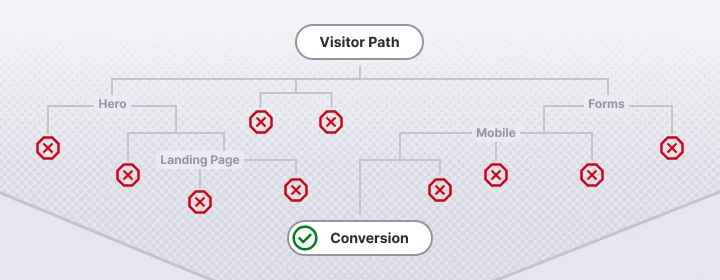
A conversion funnel maps the non-linear path visitors take from first discovering your business to completing an action. A visitor might discover you through Google search results, click on a helpful blog post, navigate to a service page, compare options, read online reviews, and finally submit a contact form.
Most users do not move through this journey in a straight line. They pause at critical decision points, evaluate your credibility, and determine whether the next step is worth their time. Common friction points where conversions go to die include:
- The Homepage Hero: When visitors cannot tell what you actually do within the first 5 seconds.
- Service or Product Pages: When the core benefits are vague and fail to speak directly to your target audience.
- Landing Pages: When there are too many distractions or the offer fails to match what the visitor expected based on the referring traffic source.
- Forms: When the submission process feels intrusive, overly long, or technically buggy.
- Mobile Pages: When the site does not load fast or proves difficult to navigate with a thumb.
- Calls-to-Action: When the next logical step is visually hidden, weakly phrased, or entirely generic.
Understanding these structural fundamentals reveals exactly where your conversion problem is occurring, helping you separate a traffic shortfall from a conversion issue after visitors arrive. Once you know where visitors hesitate or bounce, and what your bounce rate says about those drop-off points, you can systematically dismantle the exact issues killing your sales.
The 7 Critical Conversion Killers (And How to Fix Them)
If your website boasts healthy traffic but suffers from an empty pipeline or zero sales, the cause usually points directly to one or more of these seven critical conversion killers.
1. Unclear Value Proposition and Messaging
Visitors leave instantly when they cannot quickly decipher what you offer, who it is for, and why it is better than the competition. Within seconds of landing on your page, your website copy must clearly answer:
- What do you do?
- Who do you help?
- What specific result do you help them achieve?
Vague messaging is a primary reason a website isn’t converting. Many companies try to sound overly broad or highly sophisticated, relying on empty filler phrases like “We provide innovative, end-to-end solutions for modern enterprises.” That tells your ideal client absolutely nothing about why they should care. If your copy is written to appeal beyond your ideal audience, it ultimately connects with no one.
Your website should be guiding visitors based on where they are in the buying journey. Cold leads arriving via educational blog posts require helpful content and soft social proof. Conversely, high-intent visitors landing on your pricing or bottom-of-funnel landing pages need a highly visible, cta specific to booking a demo, requesting an immediate quote, or starting a purchase.
2. Misaligned Target Audience and Traffic Quality
A common reason websites fail to convert is that attracting more visitors does not help if they are the wrong fit, which inevitably triggers low engagement metrics and high bounce rates across the board. Targeting the right audience with surgical precision is crucial for improving conversion rates, as misaligned goals often cause businesses to measure the wrong conversions or waste money attracting irrelevant traffic.
A severe lack of deep market research can result in highly ineffective targeting, causing qualified and unqualified visitors alike to abandon a website without converting because they simply do not find the content relevant to their immediate needs.
To fix this, you must invest time in building data-backed buyer personas. Creating buyer personas helps businesses understand their target audience on a psychological level, making it easier to build a tailored marketing strategy that resonates profoundly with potential customers. A highly functional buyer persona must clearly outline:
- The ideal audience’s core pain points and daily frustrations.
- The exact buying triggers that prompt them to look for a solution.
- Common objections they hold regarding your product or service.
- Budget expectations and preferred procurement processes.
- Their preferred clear next step (e.g., calling, texting, or filling out a form).
3. Lack of Trust and Credibility Signals
Web visitors are naturally skeptical. They will rarely hand over personal information or credit card numbers if they do not trust your business. This trust deficit is amplified if you are operating a brand-new website, selling a high-ticket service, running a healthcare or financial company, or managing a professional services firm.
Customer testimonials and online reviews are an excellent way to build trust, as extensive studies prove that users are much more likely to respond positively to explicit recommendations from their peers. If your website isn’t converting, missing testimonials, reviews, or basic company details are often part of the problem. Utilizing social proof, such as genuine testimonials and data-driven case studies, establishes ironclad trust with potential customers by demonstrating that real people have had highly positive experiences with your business.
A clear About page that talks directly to your industry experience, verified qualifications, and the measurable results you secure for clients can significantly strengthen trust and credibility signals across your entire site. This matters because buyers routinely check who is running the business before making first contact. Featuring a co-founder, owner, or leadership team bio can humanize your company and build trust, provided it highlights relevant experience rather than generic personal trivia—for example, a certification, published speaking engagement, or industry award.
Strategic Placement of Trust Signals for Maximum Impact:
- Homepage Hero Section: Place recognizable client or partner logos directly below the main header.
- Service Detail Pages: Embed a verifiable case study featuring tangible metrics mid-page.
- Contact & Checkout Forms: Position customer star ratings and clear security guarantee badges directly adjacent to the input fields.
4. Distracting Landing Pages (Too Many Choices)
Having too many distractions on a landing page can significantly hinder conversion rates, as it completely overwhelms visitors and makes quick decision-making difficult for the user. When a page presents a user with standard navigation links, social media icons, secondary blog links, and multiple competing offers, cognitive overload sets in.
Simplifying landing pages by removing unnecessary distractions can significantly improve conversion rates, as restricting choices prevents visitors from falling into analysis paralysis or experiencing indecision. Keep your landing pages hyper-focused: one clear audience, one singular message, and one distinct action to take, because simplifying choices can make a big difference in conversion rate.
5. Absence of Urgency
A complete lack of urgency on a landing page frequently leads to lower conversion rates, as visitors may not feel compelled to act immediately without a clear, logical reason to do so. Without an incentive to act now, visitors tell themselves they will “come back later”—and they rarely do.
Using honest urgency in your calls-to-action, such as showcasing limited-time promotional pricing, displaying remaining cohort seats, or highlighting real-time inventory limits, can powerfully motivate visitors to take action immediately rather than delaying their final decision, helping hesitant users start converting instead of waiting. However, ensure this urgency is entirely genuine; fake countdown timers destroy credibility instantly.
6. Weak or Missing Calls-to-Action (CTA)
Websites that do not provide a clear and compelling call-to-action (CTA) risk losing potential conversions daily, as users may simply not know what specific action they are supposed to take next.
A clear and concise call-to-action (CTA) is essential for converting visitors, as it provides users with a frictionless opportunity to take action the exact moment they feel ready. Furthermore, a clear and compelling call-to-action (CTA) provides users with specific, explicit instructions on what to do next, such as filling out a short form or finalizing a purchase.
To maximize efficacy, CTAs should be placed prominently on the page and be incredibly easy to find, as users are significantly less likely to convert if they have to hunt through a page to find the action they need to take. Use contrasting button colors, whitespace, and action-oriented text (e.g., “Claim Your Free Audit” instead of “Submit”).
7. Poor Mobile Experience and Technical Performance
Even the most beautiful messaging and irresistible offers will fail if your site is slow, broken, or physically frustrating to navigate on a phone.
Optimizing your website for speed is absolutely crucial, as slow loading times can lead to high bounce rates and lost conversions. Every additional second of load time reduces conversions, with historical performance studies showing that most users will quickly exit digital sites that take longer than 3 seconds to fully load. If your specific landing page takes longer than 2–3 seconds to load, most people simply won’t wait around, which severely impacts your conversion rates.
Your site’s mobile-friendly experience must be audited on physical devices, not just simulated inside desktop web browser preview tools. Mobile visitors demand highly readable text sizes, thumb-friendly button dimensions, rapid load times, and streamlined forms that don’t require endless zooming and scrolling.
Diagnosing Your Conversion Issues with Real Data
Before rewriting headlines, redesigning layouts, or increasing your paid ad spend, you must diagnose your website conversion problem using real data. A strategic conversion optimization audit looks at the entire multi-page ecosystem, tracking how users navigate from blog posts to service pages, and onto your final contact forms.
The Conversion Audit Checklist
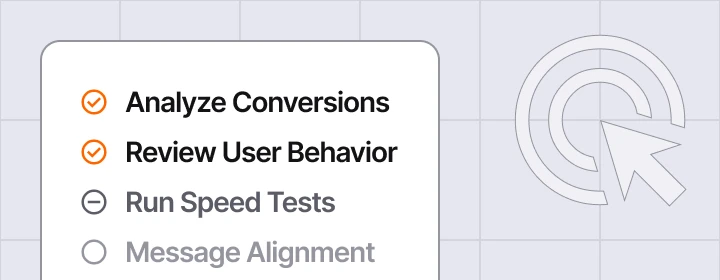
- Analyze Conversions in Google Analytics: Set up explicit tracking for form submissions, e-commerce transactions, click-to-calls, and demo requests. Segment this data by traffic source, device type, and specific ad campaigns to see if mobile users or paid ads are underperforming.
- Review User Behavior via Heatmaps: Use tools like Microsoft Clarity or Hotjar to watch session recordings. Look for where users hesitate, scroll past key points, or perform “rage clicks” on non-clickable design elements.
- Run Technical Speed Performance Tests: Use PageSpeed Insights and Lighthouse to evaluate your mobile optimization and page load speeds. Fix unoptimized images, bloated scripts, and server lag.
- Audit Message Alignment: Ensure the exact promise made in your paid ads or search meta-descriptions matches the headline on the landing page. If an ad promises “Same-Day HVAC Repair Pricing” and points to a generic homepage, you have a conversion-killing alignment mismatch.
Conversion Problem Priority Matrix
Use this strategic framework to determine which fixes to implement first based on impact, difficulty, and speed to results.
| Problem Type | Impact Level | Fix Difficulty | Time to Results |
|---|---|---|---|
| Slow Page Speed | High | Low / Medium | 1–3 Days |
| Unclear Messaging | High | Medium | 1–2 Weeks |
| Missing Trust Signals | Medium | Low | 1 Week |
| Poor Mobile UX | High | High | 2–4 Weeks |
| Wrong Traffic Targeting | Medium | Medium | 2–6 Weeks |
Common Challenges and Solutions
Why am I getting clicks but no conversions?
If you are generating healthy search engine traffic or ad clicks but zero conversions, you generally have a mismatch between expectations and reality. This happens because your marketing is targeting a broad audience rather than your ideal customers, your landing page takes longer than 3 seconds to load, or your value proposition is completely obscured by too many distractions. Review your search terms in Google Search Console and ensure your landing page perfectly fulfills the exact intent behind those clicks.
Why isn’t your website converting and how to fix it?
Your website isn’t converting because of user friction, a lack of perceived trust, or poor technical execution. To fix it, systematically step through your funnel:
- Speed up your pages to under 2 seconds.
- Add prominent customer testimonials near your call-to-action buttons.
- Condense your contact forms down to the absolute minimum required fields to create a frictionless user experience.
How to make your website convert?
To make your website convert effectively, you must transform it from a passive company brochure into an active, guided journey.
- Diversify Offers: Not everyone is ready to buy immediately. Provide low-friction options like downloadable guides, checklists, or webinars for cold leads alongside high-intent CTAs like booking calendars.
- Guide the Visitor: Use a single, crystal-clear call to action on each landing page so users know exactly what step to take next.
- Nurture Long Cycles: For B2B firms with long sales cycles, deploy automated email marketing sequences to nurture visitors who read your blog posts but aren’t ready to speak to sales today.
Conclusion and Next Steps
A low-converting website is entirely fixable. By shifting your focus away from simply buying more traffic and toward your core messaging, mobile experience, speed, and social proof, you can turn your website into a highly predictable revenue driver.
Your Immediate Next Steps:
- Check your baseline conversion rate inside Google Analytics over the last 90 days.
- Run your top 3 highest-traffic landing pages through PageSpeed Insights to uncover mobile speed bottlenecks.
- Move your best customer review or testimonial to a prominent position right below your homepage hero section.
Need a partner in solving your conversion issues?
Schedule a 30-minute consultation with a marketing consultant from Timmermann Group. We have over 20 years of experience helping our clients achieve the conversions they need to grow their businesses.